For more information on watching your favorite TV shows without a cable subscription, check out our guide on watching TV without cable.
While you can watch local TV online using a streaming service, the best way is free with an over-the-air (OTA) antenna. Connecting one antenna to multiple TVs can sometimes be an ordeal depending on the TV broadcast signal strength in your area. I’ve seen situations where all the TVs work fine if each TV has its own indoor antenna, but no TV can get reception once the outdoor antenna is installed.
These issues mainly result from improper installation of the coaxial cable and antenna cable splitters running from the antenna to each television in the house. While simply connecting a bunch of coaxial cables might result in clear TV reception, frequently, it increases the installation time due to all the unnecessary signal troubleshooting.
This article takes you through the steps you should take to avoid the common mistakes people make when installing their antenna for HDTV. It took me years to learn this, but taking the time to install something properly will save time fixing mistakes in the future.
Step 1: Position the Antenna Properly
Before you worry about connecting the antenna to multiple TVs, make sure there is optimal signal strength on one TV. Connect the antenna to one television. Ensure there are no coaxial cable splitters in the line. A grounding block should be the only thing between your TV and the outdoor antenna.
Properly position and mount the antenna to capture the most TV stations on the one TV. The FCC has a great mapping tool to show you which stations are available in your area. We discuss this in a bit more detail in our article on choosing the best TV antenna. If TV towers are positioned in multiple directions, you may want to use an omnidirectional antenna like the Mohu Sky. I found the Sky to be the best small multi-directional antenna I tried and personally used it myself.
However, if stations are situated in a single direction, perhaps a Yagi-style antenna like the 43XG may be better for your situation.
Once you’ve ensured the antenna is properly set up and the TV is capturing the channels you need, we can move on to getting all of the TVs in your house on the air high definition signals.
Step 2: The Coaxial Run
The first time someone installs an antenna, they typically think they need an amplifier. I made that mistake myself. It’s not always the case, and in fact, an amplifier can sometimes overload a strong signal causing reception issues.
So forget about the amplifiers for now. Consider it a tool for fixing reception issues should we encounter them later. For this step, we simply need a coaxial cable and a splitter.
Use RG-6 Coaxial Cable
The length of the Coaxial cable contributes to signal loss. The longer the cable, the more loss the signal can incur. In the U.S. cable installers used to use RG-59. This cable is still sold and can be found within many houses in the U.S. I recommend staying away from this older coaxial cable and opting to use the RG-6U standard.
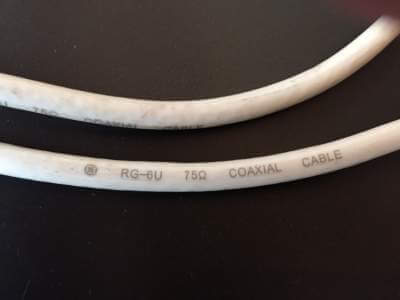
RG-6U cable has been shown to cut signal loss almost in half compared to the old RG-59 standard. These cables look very similar. The cable type is typically printed on the outer sheath of the coaxial cable. The RG-6U cable is slightly thicker in diameter compared to its RG-59 counterpart.
Use the Correct Antenna Splitter
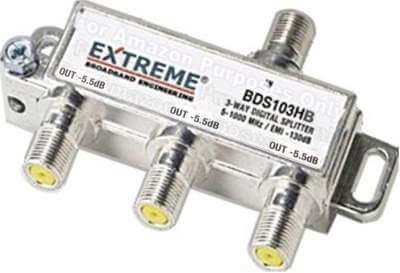
Each output of the cable splitter degrades the signal regardless of whether it’s connected to a television or not. A splitter with 4 outputs will roughly divide the original signal strength by 4 or 25%. Therefore, it’s wise to get a splitter where the number of outputs exactly matches the number of TVs you are hooking up. For more information, check out my post on choosing the right coaxial splitter.
Avoid daisy-chaining splitters. In other words, if you are hooking up 3 TVs, use a 3-way splitter instead of connecting the output of one 2-way splitter to another 2-way splitter. A 3-way splitter provides 33% of the signal strength to each TV.
However, daisy-chaining two splitters will provide 50% of the signal to the TV connected to the first splitter in the chain, while the 2 TVs connected to the second splitter only receive 25% of the signal strength. This leads to an unbalanced configuration that can make troubleshooting difficult and create issues if you expand in the future.
Also, be careful when buying a 3-way splitter. Some Are unbalanced where one output has less loss than the others. For example, one port will have -7dB while the other two outputs show a -3.5dB. This is because the internal workings of the splitter essentially daisy chain a pair of 2-way splitters. A balanced splitter will show the same loss on all outputs.
Connecting The Televisions to the Antenna
By this point, we know there is decent signal strength coming from the antenna from when we set up the first TV. Any reception lost from this point on is due to the equipment, namely the coaxial cable, splitters, and digital TV tuners.
Before connecting any televisions, draw with pencil and paper where the splitter and cable will be run in your house. Then, measure how much cable you will need for each run. Keep your cable lengths as short as possible, as the longer the length, the more signal is lost.
Now it is time to install the first TV with the splitter. We will install the TVs one at a time and test them. This will give us an idea of what point the signal drops out for a given channel. Connect the line from the antenna to the splitter input and one output to a TV. Now test to make sure the TV can receive all the channels it could before introducing the splitter.
Continue adding one TV at a time to the splitter and test for channels. Keep adding televisions until they are all installed or you aren’t receiving all the channels you should on each TV. If at any time the TV can’t receive the same number of channels, we may need to look at amplifying the signal, which I cover in the next section.
Do You Need an Antenna Amplifier?
Antenna Gain vs Amplifier Gain
Antenna amplification can be a confusing topic. There are generally two types of signal amplification regarding antennas. The first is usually called “antenna gain.” This is amplification inherent within the antenna. It is a term mainly used when discussing directional antennas.
The gain being discussed with “antenna gain” isn’t really adding any power to the signal. It’s more of a representation of how well the antenna converts the signal wave to an electric current. Directional antennas concentrate that ability in one direction, hence sacrificing gain in other directions.
The other type of amplification amplifies the signal after it is received. This is typically referred to as “amplifier gain” and will not make the signal better than what is received by the antenna. Only antenna gain will improve picking up a signal from the TV tower. Amplifier gain is used to overcome the loss in the line and noise from the digital tuners on the TV.
This distinction is important. If you can receive all the channels you need when hooking the antenna directly to one television, then amplification is only needed to overcome signal loss in the line due to cable connections and splitters. However, if you were having issues before any splitters were introduced, then we may need to look at purchasing a directional antenna with higher gain.
Which Amplifier to Use?
Amplifier gain is mainly delivered from 2 devices, a preamplifier or a distribution amplifier. They essentially perform the same function with a slight difference. A preamplifier is installed at the antenna and amplifies the signal. A preamplifier should be used to overcome a long coaxial cable (over 100ft) in between the antenna and the splitter (or the lone TV).
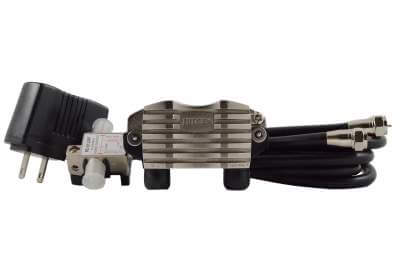
A distribution amplifier is installed just before the splitter and is used to amplify the signal for splitting to multiple TVs. Some distribution amplifiers, like the one pictured below, also function as a splitter.
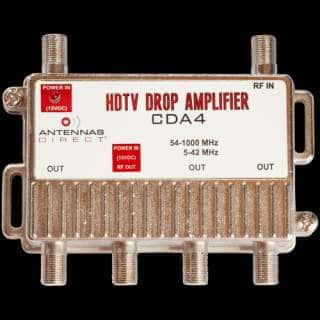
These amplifiers both have similar functions. Generally, if there is a long cable run before the splitter, try installing a preamplifier to see if it fixes the issue. On the other hand, if you see loss not from the line but the splitter, you will want to try using a distribution amplifier.
Some situations may even require both if you are installing multiple TVs with a very long run of coaxial cable between the antenna and splitter.
To Much Signal Can be a Bad Thing
The reason we want to first try installing without amplifiers first is signal overload. If the signal is strong from the tower, too much amplification can overload the tuner and cause the TV tuner not to receive the channel. Amplification should always be seen as a way to improve reception, not installed by default.
