Grounded Reason

Home » Cord Cutting » TV Antennas and OTA DVRs » Old TV? Use a Digital Converter Box

Old TV? Use a Digital Converter Box

Updated on 2023-05-01 By Dennis Restauro

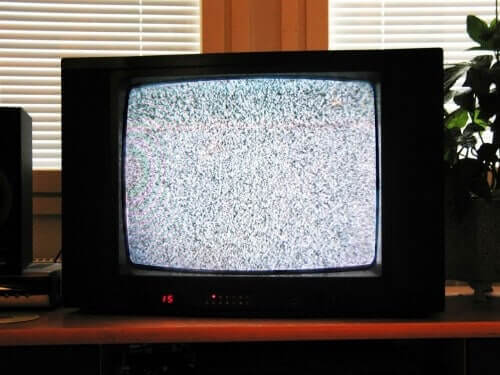
tube tv
I love getting emails from readers with questions about how to watch TV without cable. Word is spreading that you can save thousands of dollars on a cable bill and still enjoy your favorite programs.

As I said in my Mohu Leaf Review, TV from an antenna is crystal clear. The picture quality is much better than cable, and most of the hit shows are available free over the air. However, the one question that keeps popping up is “how do I watch digital channels on an old tube TV?”

When broadcast TV signals in the US went digital in 2009 (2011 in Canada) laws were in place to ensure new TVs being manufactured were equipped with a digital tuner to receive the signals.

TVs made before that time were made with analog tuners. Those TVs will not work with a digital signal unless you have a digital TV converter box, also known as a DTV converter box.

What’s a DTV Converter Box?

A digital converter box is a device that connects to your existing analog TV and your antenna. It translates the digital signals being picked up by the antenna into an analog signal that can be received by your TV tuner.

Prices range from $30 –  $80 for a DTV converter box based on the quality of the brand. Many are available Online from Amazon.

Does my TV need a Digital Converter?

To answer this you need to know if the TV has a digital tuner (also called a digital receiver.) If it does, then you do not need a converter box for your TV. Otherwise, the TV tuner is analog and you either need to buy a digital TV or a DTV converter box to get free TV with an antenna.

The easiest method to figure out what type of tuner your TV has is to look in the owner’s manual. The specifications should let you know whether your TV is analog or digital.

However, if you are anything like me, you have no idea where that owner’s manual is. In that case grab the model number off the back of the TV and check the manufactures website. They should have specifications on older models letting you know if the TV is analog or digital.

Your TV may also have writing near the connectors on the back giving you a clue to the type of tuner. If you see words referencing “NTSC” or “analog” then the tuner is likely not digital. If it were, you would see words like “ATSC”, “DTV”, or “Digital” on the back of the TV near the connectors.

Installing a DTV Converter Box

Of course, follow the installation instructions that come with the digital converter box. I’m sure you will find installation of a digital converter box is quite easy. Simply connect your antenna to the “Input” on the converter box via coaxial cable.  It will usually be labeled with words like “Antenna In.”  Then connect the DTV converter output to the antenna input on your television.

If you do not have a coaxial connection on your antenna or TV, then you most likely have a “twin lead.” This issue can be solved by using a 300 to 75 ohm twin lead to coax adapter.

The converter box may have RCA connecters, in which case you can use the cables pictured below.
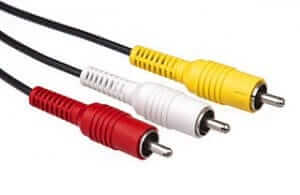
RCA cablesIf you have a TV that doesn’t have any of the connections described in this article check out this reference on various TV connectors. Once you find the connection your TV has, you can likely find a converter to join it to a the connection required by your DTV converter.

My Recommendation

Considering the monthly cost of cable, upgrading your old tube TV with a DTV converter is a sensible decision. However, the price of new HDTVs has come down drastically. You can typically find one for the cost of 2 months of cable.

You don’t need a smart TV to cancel cable. Most new TVs typically have HDMI cables which will allow you to leverage TV streaming devices like Roku and Apple TV.  Combine these devices with your antenna and you will have little need for cable TV. So if you can afford the one-time cost, I’d go with a new TV.

About The Author

Dennis Restauro

Dennis started Grounded Reason in 2014 to share his expertise in streaming devices, streaming services, local networking, and cutting the cord on cable TV. His expertise has been leveraged by The Washington Post, Forbes, Kiplinger, The Fiscal Times, podcasts, and other media. Dennis has spent over 25 years working in technology for the public and the private sector as a systems administrator and enterprise systems architect. Dennis is a graduate of Towson University with a degree in Computer Science. See Dennis on LinkedIn.

View all posts by Dennis Restauro

*Disclosure: Grounded Reason is supported by a small commission for purchases made through product links on this website. We do not accept compensation from companies attempting to sway our review of products.

Need More Information?

If this article didn't answer your specific question, head over to our Home Page! It will guide you to affordable internet providers, streaming services to meet your needs, information on antennas, and many more tools and resources to help you save money on TV and Internet access.

For the latest news tips and tricks on cutting the cord and other tech topics be sure to like our Facebook Page.

  • About
  • Privacy Policy
  • Terms and Conditions
  • Contact Us

Copyright © 2026 Grounded Reason LLC, All rights reserved.

MENU
  • Streaming Services
    • DIRECTV STREAM
    • Hulu
    • Philo
    • FuboTV
    • YouTube TV
    • Netflix
    • Prime Video
    • Peacock
    • Paramount+
    • Disney+
    • Max
    • ESPN+
    • Apple TV+
    • Other Streaming Services
  • Streaming Basics
  • Stream Sports
    • Streaming NFL Games
      • Arizona Cardinals
      • Atlanta Falcons
      • Baltimore Ravens
      • Buffalo Bills
      • Carolina Panthers
      • Chicago Bears
      • Cincinnati Bengals
      • Cleveland Browns
      • Dallas Cowboys
      • Denver Broncos
      • Detroit Lions
      • Green Bay Packers
      • Houston Texans
      • Indianapolis Colts
      • Jacksonville Jaguars
      • Kansas City Chiefs
      • Las Vegas Raiders
      • Los Angeles Chargers
      • Los Angeles Rams
      • Miami Dolphins
      • Minnesota Vikings
      • New England Patriots
      • New Orleans Saints
      • New York Giants
      • New York Jets
      • Philadelphia Eagles
      • Pittsburgh Steelers
      • San Francisco 49ers
      • Seattle Seahawks
      • Tennessee Titans
      • Tampa Bay Buccaneers
      • Washington Commanders
    • Streaming NBA Games
      • Atlanta Hawks
      • Boston Celtics
      • Brooklyn Nets
      • Charlotte Hornets
      • Chicago Bulls
      • Cleveland Cavaliers
      • Dallas Mavericks
      • Denver Nuggets
      • Detroit Pistons
      • Golden State Warriors
      • Houston Rockets
      • Indiana Pacers
      • LA Clippers
      • Los Angeles Lakers
      • Memphis Grizzlies
      • Miami Heat
      • Milwaukee Bucks
      • Minnesota Timberwolves
      • New Orleans Pelicans
      • New York Knicks
      • Oklahoma City Thunder
      • Orlando Magic
      • Philadelphia 76ers
      • Phoenix Suns
      • Portland Trail Blazers
      • Sacramento Kings
      • San Antonio Spurs
      • Toronto Raptors
      • Utah Jazz
      • Washington Wizards
    • Streaming NHL Games
      • Anaheim Ducks
      • Arizona Coyotes
      • Boston Bruins
      • Buffalo Sabres
      • Calgary Flames
      • Carolina Hurricanes
      • Chicago Blackhawks
      • Colorado Avalanche
      • Columbus Blue Jackets
      • Dallas Stars
      • Detroit Red Wings
      • Edmonton Oilers
      • Florida Panthers
      • LA Kings
      • Minnesota Wild
      • Montreal Canadiens
      • Nashville Predators
      • New Jersey Devils
      • New York Islanders
      • New York Rangers
      • Ottawa Senators
      • Philadelphia Flyers
      • Pittsburgh Penguins
      • San Jose Sharks
      • Seattle Kraken
      • St. Louis Blues
      • Tampa Bay Lightning
      • Toronto Maple Leafs
      • Vancouver Canucks
      • Vegas Golden Knights
      • Washington Capitals
      • Winnipeg Jets
    • PGA Tour
    • Other Sports
    • MLB
  • Stream Any Channel
  • Stream Local Networks
  • Compare Streaming Devices
  • Stream TV Shows